

AI contract review starts from a very ordinary moment at a law firm: a client forwards the supplier’s cloud contract on Tuesday and wants comments by Thursday. The lawyer already knows what to look for, because the firm has its own position on liability caps, price changes, data return and breach notices. The hard part is going through every clause, quoting it accurately and writing redline wording for each departure. We built an assistant for a Lithuanian law firm that does that first pass against the firm’s own guidelines, and a second one that answers questions about a case file using only the documents in it.
The problem: why law firms need AI contract review that follows their own playbook
Commercial lawyers who act for the customer side of IT deals see the same supplier templates again and again. The issues repeat, but the work does not get shorter:
- Every contract is read from scratch. The same eleven or so questions are asked each time, clause by clause, often under deadline.
- Data protection adds a second checklist. If the supplier processes personal data, the contract or its addendum has to cover every element of GDPR Article 28(3), and gaps are easy to miss in a long document.
- Comments have to be quoted exactly. A comments table that misquotes the clause it criticises loses credibility in negotiation.
- Redline wording takes the most time. Spotting a one-sided clause is quick; drafting a balanced replacement is not.
- Case files are scattered. When a dispute builds up, the facts sit across the contract, emails, minutes and acceptance acts, and a simple question like “did the supplier ever admit the delay?” means rereading all of them.
What we built
The assistant has two tabs. The first reviews IT, cloud and data processing contracts against the firm’s guidelines:
- The lawyer pastes or opens a contract. In the test pack there are three: a Lithuanian cloud services contract, an English data processing addendum and a Lithuanian app development contract.
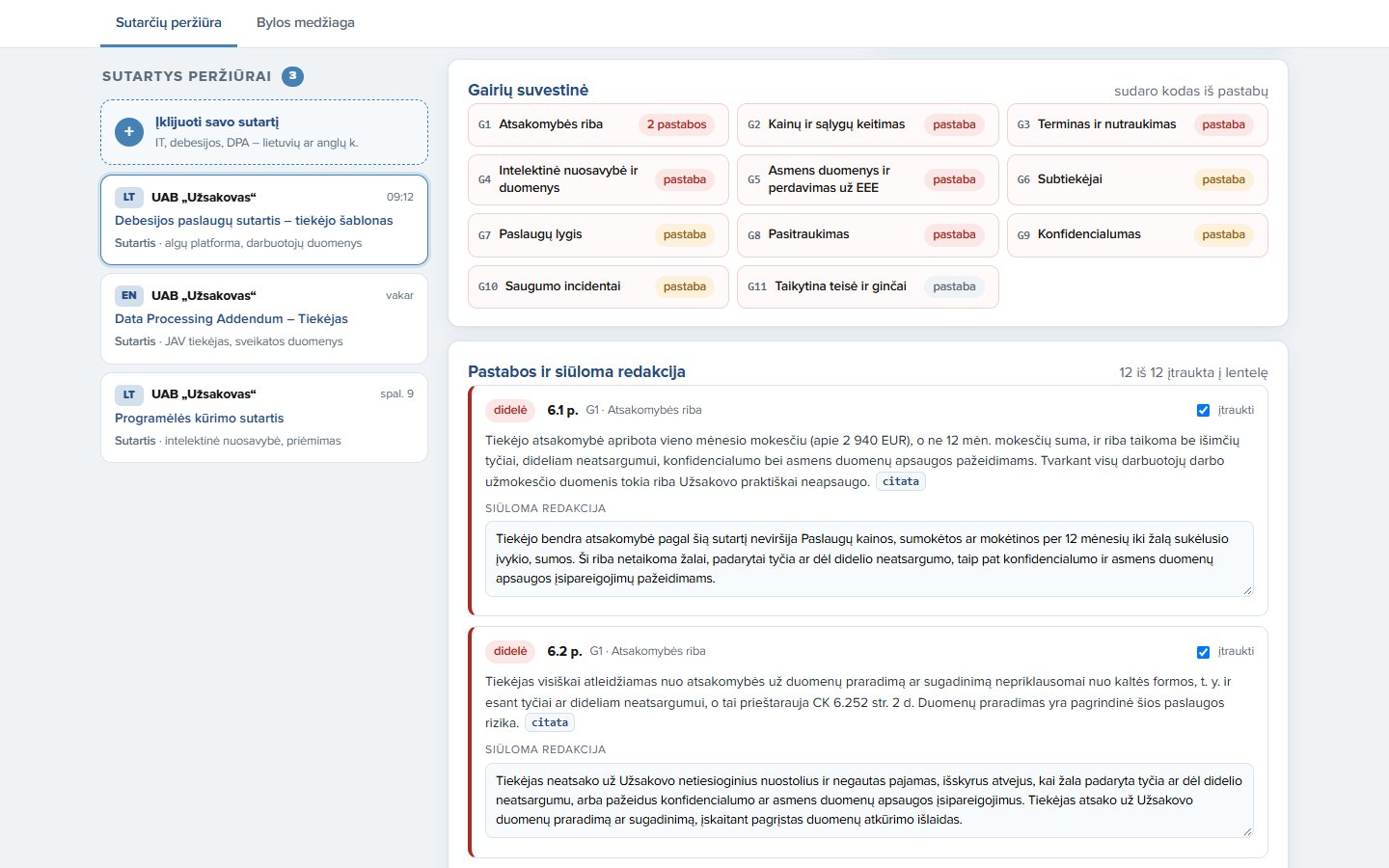
- The model reads it against 11 firm guidelines. They cover liability caps, price changes, term and termination, IP and data ownership, transfers outside the EEA, subcontractors, service levels, exit and data return, confidentiality, security incident notice and governing law. For each departure the model gives a risk level (high, medium or low), the exact quote, a short explanation and proposed replacement wording in the contract’s language. Where a clause is missing, it says so instead of inventing a quote.
- It checks the nine GDPR Article 28(3) elements. Each is marked as covered, partly covered or missing, with a quote where one exists.
- Code verifies every quote and builds the summary. Each quote is searched for in the contract text, word for word, and the lawyer can click it to see the passage highlighted. Code then builds a guideline summary: for each of the 11 guidelines, whether the contract departs from it, meets it, or does not address it.
- The lawyer selects findings and downloads the table. Findings can be ticked in or out and the proposed wording edited. The final table, with clause, current wording, comment and proposed wording, plus the Article 28(3) check and questions for the client, downloads as a Word document.
The second tab handles a case file. The lawyer asks a question in plain language and the assistant answers only from the 9 documents of a fictional ERP implementation dispute: the contract, emails, meeting minutes, an acceptance act, a claim and the supplier’s reply. Every statement carries a citation to the document it comes from, and code checks that each quoted passage really appears in that document. Asked for a chronology, it returns dated events, which code sorts in order. It is instructed to point out facts that cut against the client, not only favourable ones, and to list open points the lawyer should check. When the answer is not in the file, for example whether the supplier holds professional liability insurance, it says so plainly and names the document that would be needed.
What changes for the legal team
| Before | With AI contract review | |
|---|---|---|
| Starting point | Blank page and the lawyer’s memory of the firm’s position | A first-pass issues list against the firm’s 11 written guidelines |
| GDPR Article 28(3) | Separate manual checklist, easy to skip on a busy day | All nine elements marked covered, partial or missing, with quotes |
| Quotes | Copied by hand from the PDF | Every quote checked word for word against the text; in the test pack, 49 of 49 were found |
| Redlines | Drafted from scratch for each clause | Proposed wording in the contract’s language, edited by the lawyer |
| Client deliverable | Comments table assembled manually in Word | Selected findings downloaded as a Word table |
| Case questions | Rereading emails and minutes to find one admission | An answer with citations to the exact document, or a clear “not in the file” |
Where people stay in control
The split of work is deliberate. The model reads, quotes, classifies departures and drafts wording; it is told that the lawyer decides and that it does not give a final legal opinion. Code does the parts that must be exact: it checks that each quote exists in the source, builds the guideline summary from the findings, puts the Article 28(3) elements in a fixed order and sorts chronology events by date. The lawyer chooses which findings go to the client, rewrites the proposed wording where needed and owns the advice. In the case file tab, where a question needs a deadline count, the model shows its inputs and arithmetic, including which public holidays it skipped, so the lawyer can check it line by line.
The limit is honest too: the quote check proves the words are in the contract, not that the reading of them is right, and the guideline summary can only reflect what the model flagged. A clause the model overlooks shows up as “not addressed”, which is a prompt for the lawyer to look, not a clean bill of health. The guidelines in the test pack were written for this build; in real use the firm’s lawyers would write their own.
Where else this works
The same pattern, a written playbook, a model that quotes and drafts, and code that verifies, fits anywhere contracts are reviewed against a fixed position:
- In-house legal and procurement: checking supplier templates against company contracting standards before they reach the legal team.
- Data protection officers: screening processor agreements and addenda for the Article 28(3) elements across a vendor portfolio.
- Litigation and claims teams: asking questions of a growing case file and getting answers tied to the exact document and passage.
Related use cases: Tender document review with AI · Lease abstraction with AI · KYB document check automation. All Contracts & documents to data use cases · How we deliver this: Custom AI solutions
FAQ
Can AI review contracts against our firm’s own playbook?
Yes. The guidelines are written into the assistant as plain rules, 11 in our build, and every finding is tied to one of them, with the quoted clause and proposed wording. The firm’s lawyers write and update the guidelines; the assistant applies them consistently.
How do you stop the AI from inventing clauses or quotes?
The model is instructed to quote only what the contract says and to leave the quote empty when a clause is missing. Code then searches the contract for every quote word for word and marks any that it cannot find, so the lawyer sees at once which passages are verified.
Does AI contract review replace the lawyer?
No. It prepares a first-pass issues list and draft redlines. The lawyer decides which findings matter for the client, edits the wording and gives the advice. The assistant is told explicitly that it does not give a final legal opinion.
Would a first-pass review against your own playbook free up your associates for the negotiation itself? Talk to us