


AI tax return review starts from a familiar moment: a client sends financial statements, filed corporate income tax returns, trial balances, monthly VAT returns, a payroll tax return and a fixed asset register, and asks whether anything was missed. Before a tax advisor can form an opinion, hours go into reading, copying figures into a working sheet and cross-checking one document against another. We built an assistant for tax advisors that runs the whole review in seven steps: it requests and sorts the documents, extracts every figure with its source, reviews each tax area, prepares the client questions, checks the reliefs by rule and recalculates the saving, and assembles the report. The advisor starts from a sourced draft and decides what goes to the client.
The problem: a thorough tax return review is slow and easy to get wrong
A review of someone else’s tax returns is valuable because it is thorough. It is also repetitive work spread across documents that were never designed to be read together:
- Documents arrive incomplete. One year’s trial balance is missing, the tax workings never came, two years of VAT returns are still with the accountant. Chasing them is admin work that delays everything else.
- Facts are scattered. Profit sits in the financial statements, the reliefs claimed in the tax return, the R&D and asset detail in the trial balance and the asset register, payouts to shareholders in the payroll tax return.
- Every relief has conditions. An investment relief depends on the asset group, whether the asset is new and how long it stays in use. An R&D deduction depends on the nature of the work and on what was already claimed. Missing one condition changes the answer.
- The arithmetic is unforgiving. Rates differ between years, a grant reduces the base, capitalised costs behave differently from expensed ones, and a deduction claimed now can mean a deduction lost later.
- Every number needs a source and a legal basis. An advisor cannot send a client an amount without showing where each figure came from and which article of law it rests on.
What we built
The assistant follows the steps a tax advisor already takes, and splits the work in each one: AI reads, code calculates, the advisor decides.
- Request documents. The standard document list becomes a checklist with one line per document and year, and the request e-mail to the client is drafted from it.
- Collect and classify. Files dropped into the client folder are recognised automatically: what each one is, which year it covers and which checklist line it closes. A received-and-missing matrix shows the gaps at once, and a reminder e-mail lists exactly what is still outstanding.
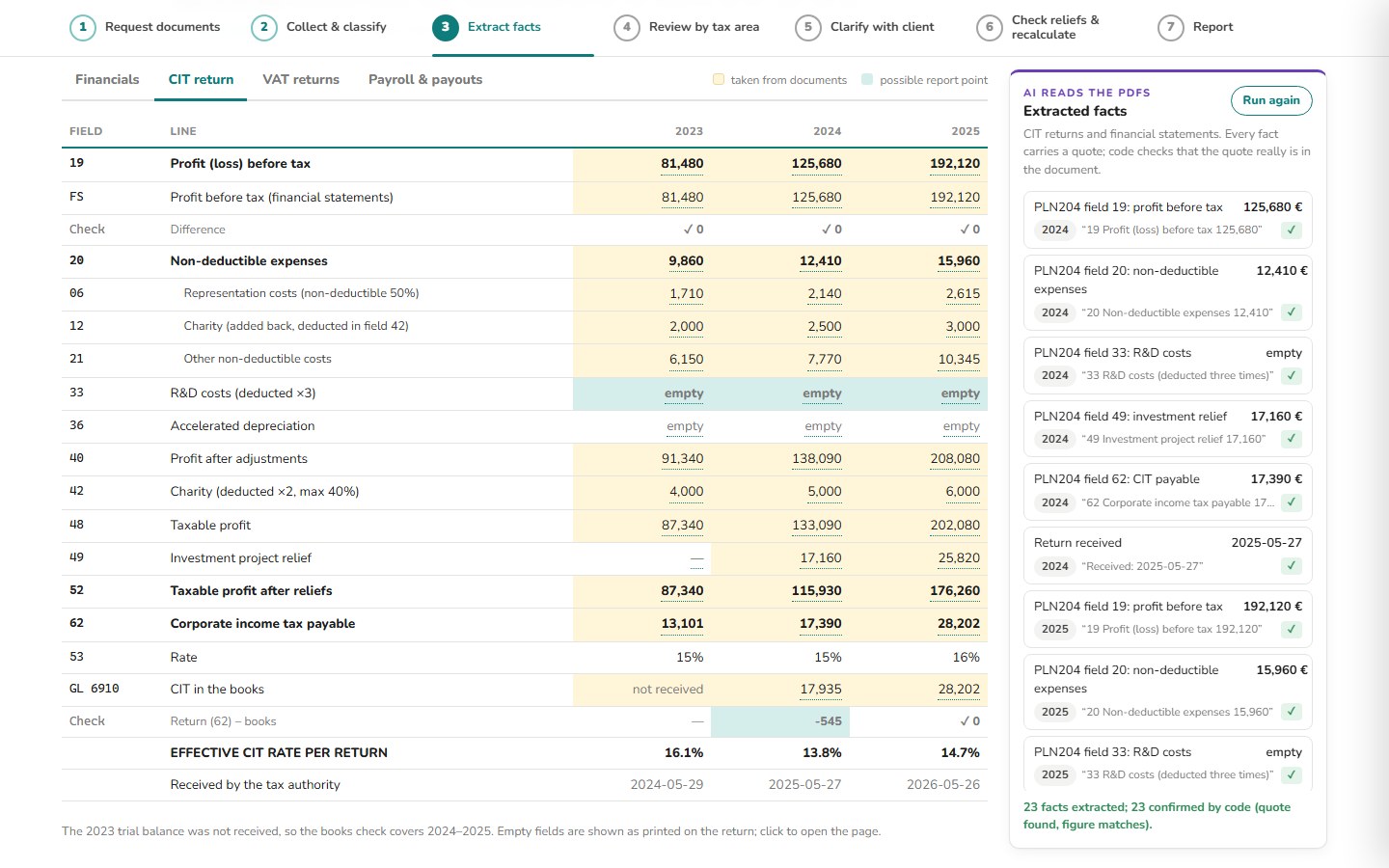
- Extract facts. Financial statements, tax returns, trial balances and VAT returns are laid out side by side. The model reads the PDFs and extracts each figure with a quote; code checks that the quote is really in the document and that the figure matches the spreadsheets. Click any number and the source opens at the right page, cell or field. Code also runs the cross-checks: profit on the return against the accounts, tax on the return against the books, VAT boxes against each other, VAT sales against revenue.
- Review by tax area. Every review line, from R&D costs and investment relief to charity, representation, input VAT and shareholder remuneration, gets a first-pass comment, an answer to whether the documents show it, and a question for the client where something is unclear. Candidates for the report are marked.
- Clarify with the client. Open questions are grouped by tax area. After the call the advisor marks each one as answered, partly answered or open, and the follow-up e-mail for what is still open writes itself.
- Check reliefs and recalculate. Rules in code, not AI, test the conditions of each relief and recalculate the possible saving with the client’s own figures: each condition is marked met, not met or still to confirm, the formula is shown step by step, and the legal basis opens next to it. Every amount is a hypothesis to verify, and items below the materiality threshold are listed but not added to the total. A decision log records what goes ahead, who owns it and by when.
- Report. The report is assembled from the findings the advisor keeps: a summary, the effective tax rate over three years, one slide per material finding with the amount by year and the next steps, and the other observations. A workbook with the full review and a cover e-mail come with it.


What changes for the tax advisory team
| Before | With AI tax return review | |
|---|---|---|
| Collecting documents | A request list by e-mail, then tracking by hand what arrived | A checklist by document and year, files recognised on arrival and a reminder listing only what is missing |
| Reading the client file | Open each document and copy figures into a working sheet | Figures laid out side by side, each one clickable to its page, cell or field |
| Cross-checks | Reconcile the return, the accounts and the VAT returns by hand | Code reconciles them and flags every difference |
| Review notes | Write a comment for every line from scratch | A first-pass comment and a client question on every line, ready to edit |
| Checking reliefs | Go through the reliefs from memory or a checklist | Rules test each condition and recalculate the saving with the formula and legal basis shown |
| Client deliverable | Build the report, the workbook and the e-mail separately | Report, workbook and cover e-mail assembled from the findings the advisor keeps |
In the example shown in the screenshots, a fictional engineering company with 23 documents for 2023–2025, the review finds R&D costs booked and partly capitalised while the R&D field on the returns is empty, and machinery that is missing from the investment relief base. The recalculation shows up to 30.1k EUR that could be claimed by amending returns and 9.5k EUR that depends on changes in the following year, 39.6k EUR in total. These figures belong to the example company, not to any real client. What matters is that every amount traces back to a formula, a figure in a document and an article of law, and the same documents always produce the same result.
Where people stay in control
The split of work is explicit on every screen. The model reads the PDFs, extracts figures with quotes and writes the first-pass comments. Code checks the quotes, runs the reconciliations, applies the relief rules and does all of the arithmetic. The advisor decides what to check, what to ask the client and what goes into the report. Conditions that cannot be confirmed from the documents stay open rather than being counted: the R&D relief, for example, remains a finding to verify until someone confirms that the work qualifies and is documented, and the assistant lists the documents still needed to confirm it. Nothing is sent to the client automatically; every e-mail is a draft.
Where else this works
The same pattern of sourced extraction, rules in code and a recalculation the expert signs off fits wherever a professional reviews someone else’s numbers against written rules:
- Accounting firms: year-end reviews of client ledgers for misclassified expenses and non-deductible items before the return is filed.
- Corporate finance teams: an internal check of the company’s own tax returns and reliefs before the auditor or the tax authority asks.
- Grant and incentive consultants: testing whether a client’s investments and R&D spending meet the conditions of a support scheme, with the clause behind each answer.
Related use cases: AI business case for accounting firms · Supplier invoice reconciliation with AI · Tender document review with AI. All Document checks & reconciliation use cases · How we deliver this: Custom AI solutions
FAQ
Can AI review a corporate tax return?
AI can read the return and the supporting documents and extract the relevant figures with quotes. In our build, the cross-checks, the relief rules and the recalculation are done by code, and a tax advisor makes the final call on every finding.
How do you know the figures the AI extracts are right?
Every extracted figure carries a quote from its document. Code checks that the quote is in the document and that the figure matches the spreadsheets and returns it was parsed from, and anything that does not match is flagged for review.
Which tax reliefs can the assistant check?
Our build checks reliefs and items such as the R&D deduction, investment relief, charity, representation costs, the tax rate applied, input VAT, VAT sales against revenue, shareholder remuneration and employee benefits, each with its conditions, formula and legal basis.
Want your team’s tax return reviews to start from a sourced draft instead of a blank page? Talk to us