


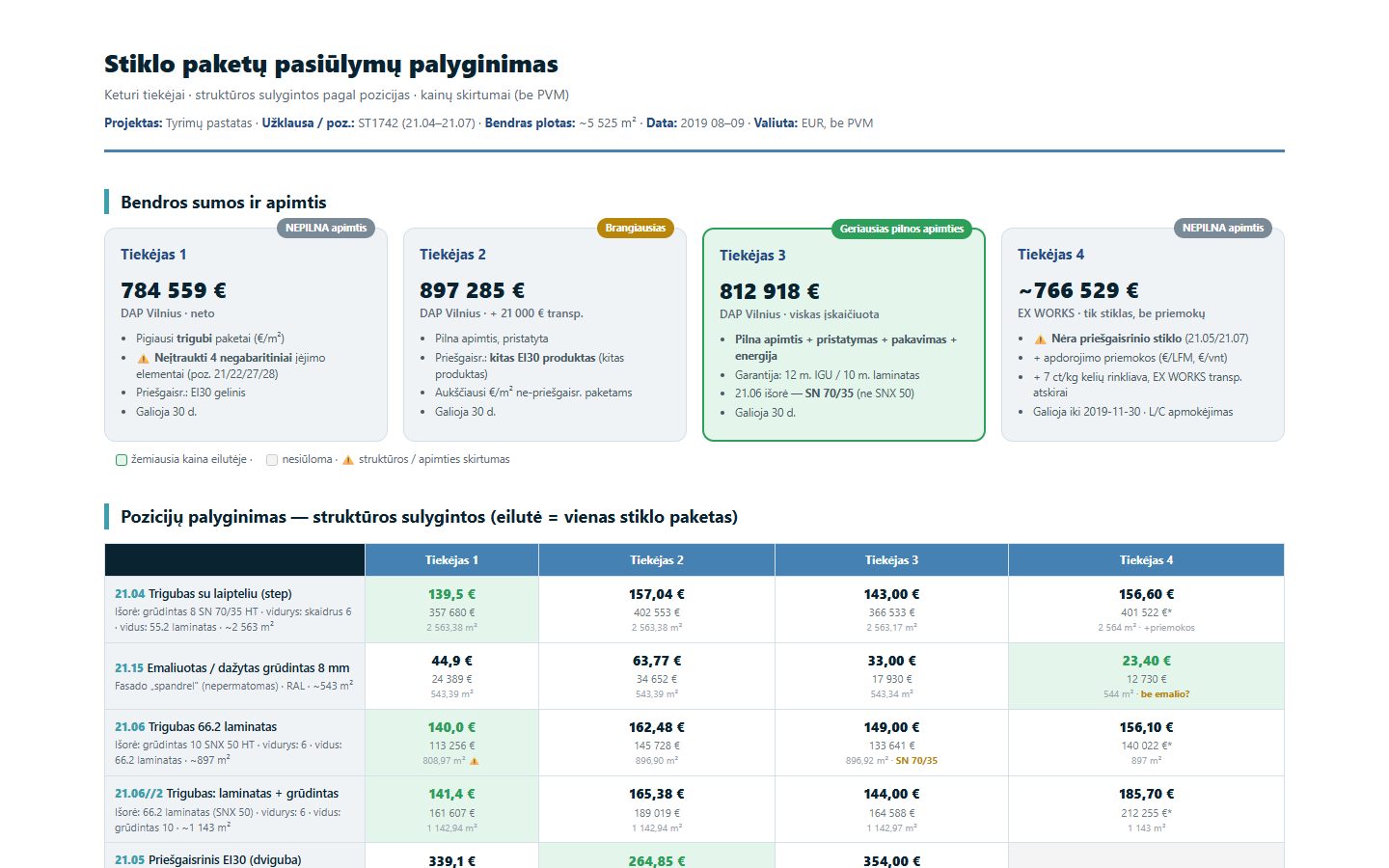
Subcontractor bid comparison is where construction margins are won or lost, and it is still done by copying numbers from PDFs into a spreadsheet. For a large general contractor, we took four real glazing offers for the insulated glass units of a research building (about 5,525 m² of glass) and turned them into one aligned comparison. The headline totals ranged from about €766,500 to €897,300. The lowest one was not the cheapest, because it did not include everything.
The problem: four bids, four ways of describing the same glass
Every supplier answers the same enquiry in its own structure. In this package:
- Positions were split differently. One supplier priced a roof position as two separate lines; others as one.
- Scope was not the same. One bid left out four oversized entrance units that exceeded its production limits. Another did not offer fire-resistant glass at all, around 377 m² missing from its total.
- Products were not the same. For the fire-rated EI30 units, two suppliers offered one type of product and a third offered a different technology. For one façade position, a supplier quoted a different outer glass with potentially different light and solar properties.
- Commercial terms differed. Three bids were delivered to site; one was ex works, with transport, edge processing and a weight-based road toll on top.
An estimator has to discover all of this before the totals mean anything. Missing one of these differences is how a “cheapest” bid becomes the most expensive one after the contract is signed.
What we built
A bid comparison that does the reading and the alignment, and leaves the judgement to the estimator:
- Upload the offers as they are. PDFs in each supplier’s own layout, no re-typing.
- Extract every position. Glass build-up, area, unit price and line total, plus validity, delivery terms, warranty and payment terms.
- Align positions by what they are, not where they appear. Each row is one glass unit type, so each supplier’s price sits next to the others for the same specification.
- Flag scope and product differences. Missing positions, different products, reduced areas and extra surcharges are marked on the line and summarised above the table.
- Show adjusted totals. Each headline total comes with what it includes and excludes, so the comparison is between like and like.
What changes for the estimating team
| Before | With AI bid comparison | |
|---|---|---|
| Getting the data | Numbers copied from each PDF into a spreadsheet | Every position extracted from the original documents |
| Aligning positions | By hand, supplier by supplier | One row per glass unit type across all bids |
| Scope gaps | Found late, sometimes after award | Flagged on the line and in the summary |
| Different products | Easy to miss inside long build-up descriptions | Highlighted where the specification differs |
| Commercial terms | Read separately | Delivery, validity, warranty and payment side by side |
| The decision | Based on headline totals | Based on what each total actually covers |
In this package, the comparison made the ranking obvious: the best full-scope offer was the third one at €812,918 delivered and all-inclusive, while the two lower totals each excluded part of the scope.
Where people stay in control
The comparison does not choose a supplier. It shows the estimator what is different and why, with every number traceable to the page it came from. Questions such as “is this outer glass acceptable?” stay with the people who own the specification. Where a supplier’s total had to be calculated from unit prices and areas, it is marked as calculated, not quoted.
Where else this works
The same approach fits any procurement decision based on offers in different formats:
- Other trades: façade, steel, MEP and fit-out packages compared against one bill of quantities.
- Tender documents: requirements checked for contradictions before the bid goes in.
- Wholesale: supplier invoices reconciled against purchase orders.
For document-heavy bids, our product extriq extracts answers from tender and offer documents with a source reference for every answer.
Related use cases: Tender document review · Supplier invoice reconciliation · Automated technical quotation. All Document checks & reconciliation use cases · How we deliver this: Custom AI solutions · Document extraction as a product: extriq
FAQ
Can AI compare subcontractor bids that use different formats?
Yes. Each offer is read in its original layout, every position is extracted, and positions are aligned by specification rather than by line number, so different structures end up in one table.
How does it handle scope differences between bids?
Missing positions, different products, reduced areas and extra surcharges are flagged on the line and summarised next to each total, so headline prices are not compared blindly.
Does the AI pick the winning bid?
No. It prepares a like-for-like comparison with sources. The estimator and the project team make the decision.
Send us one of your recent bid packages and we will show you what the comparison would look like. Talk to us