



AI candidate matching gives an IT staffing team a shortlist the moment a client request arrives, instead of after an afternoon of filtering and reading profiles. We built a matching layer for an IT contractor and outsourcing company that compares every open project with every available specialist, scores each pair, explains what matches and what is missing, and suggests the one question to ask the candidate next. The recruiter decides who to contact; the searching is already done.
The problem: the best match is often already on the bench
The company has built a network of well over 5,000 IT contractors over ten years and has worked with around 400 of them. A small internal team, four people in practice, handles about 20 active client requests a month. Almost every request arrives by email, even when the client fills in a form on the website.
The work behind each request is the same every time: register the request, filter the database by technology, open each candidate’s card (conversation history, interview notes, availability), build a shortlist, write personal messages, and prepare a CV in the company’s format. Filtering by a single technology does not work, because every request needs a different combination of skills with different priorities. Sometimes the deciding factor is the language, not the framework.
The expensive part is not the time alone. When open projects and available specialists sit in two separate lists, good matches are missed, and a specialist who is free right now stays without a project.
What we built
A matching layer that sits next to the company’s existing system and does the comparison work:
- It reads every open project and every available profile. In the first run, 11 open projects and 61 available specialists, 671 pairs, compared in a few milliseconds.
- It scores each pair on the full skill combination. Each technology counts, with priorities per request. A match percentage is shown for every candidate.
- It explains the score. Matching skills are marked green, close ones amber, missing ones crossed out, next to status, availability, location, rate terms and languages.
- It suggests what to ask. For each candidate it writes the one question that would close the gap, for example whether they have worked with the missing test framework.
- It also works from a free-text request. Paste a client’s email, and it shows what it understood (and what it did not), then the same scored shortlist.
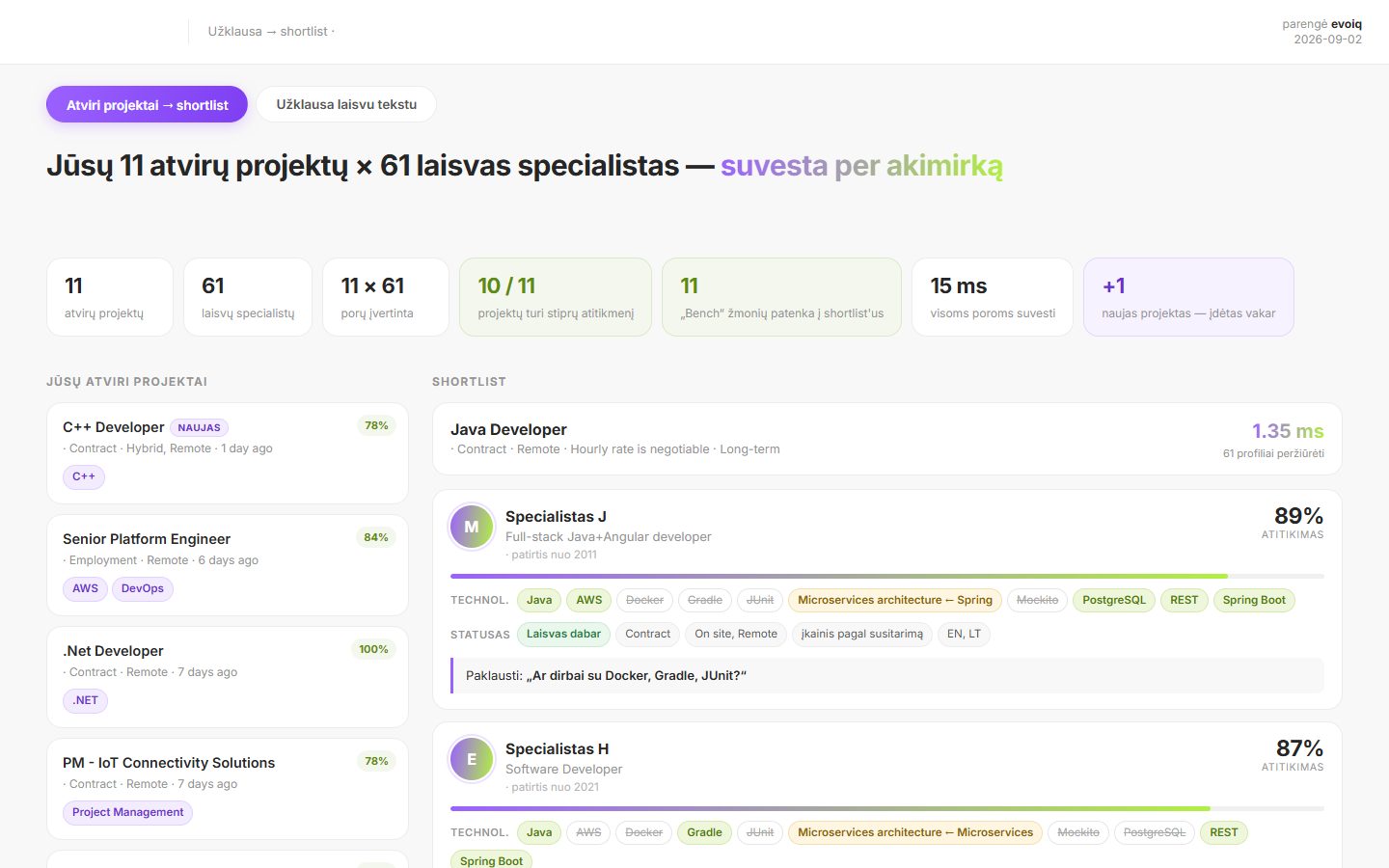
The first run made the point on its own: 10 of the 11 open projects had at least one strong match (60% or more), and 11 specialists who were available right away appeared in those shortlists. A project posted the day before already had an available specialist at 78%.
What changes for the recruiting team
| Before | With AI candidate matching | |
|---|---|---|
| First shortlist | Built by filtering and reading cards | Ready when the request arrives |
| Matching logic | One technology at a time | Full skill combination with priorities |
| Explaining a choice | In the recruiter’s head | Visible: matching, close and missing skills |
| Available specialists | Easy to overlook | Surfaced against every open project |
| Next step with a candidate | Generic message | A specific question to close the gap |
The team keeps the part that makes the business work: the relationship with each contractor. The matching layer removes the searching that comes before it.
Where people stay in control
The recruiter chooses who to contact and what to send to the client. Scores are explained, not hidden, so a wrong score is easy to spot and the rules can be adjusted. The matching layer connects to the existing system through its API: the system stays the single source of truth, and its own logic does not get more complicated.
One honest limit: a match is only as good as the data behind it. When a project lists only two technologies, several candidates score 100%, and the screen says so. That is a prompt to improve request quality, not a reason to trust the number blindly.
Where else this works
The same matching pattern applies wherever requests have to be paired with a list of people or products:
- Freight and logistics: a transport request becomes a priced offer.
- Technical distribution: a customer email becomes a product selection and cost estimate.
- Internal resourcing: project staffing needs matched with consultants’ skills and availability.
Related use cases: Freight quote automation · Automated technical quotation · AI meeting minutes and project status. All Requests to quotes use cases · How we deliver this: AI automations
FAQ
Does AI decide which candidate is sent to the client?
No. It prepares a scored, explained shortlist. The recruiter decides who to contact and who to put forward.
Do we have to replace our recruitment system?
No. The matching runs as a separate layer connected through the system’s API. The existing system stays the data source.
What if a client request is vague?
The assistant shows what it understood and what it could not find, then matches on the available information. Missing details become questions for the client.
Want to see your open requests matched against your own contractor base? Talk to us